
Exporting a Prism Report to Word and Excel: A Dossier and Change Table
· Prism
Prepare the research result in Prism to hand over a readable report, decision table, and sources from one working context. See how to choose an export format and leave a clear next action.
1. Choose the example output
Use the previous version, received version, and brief to obtain a change table. Alternatively, open the Nova Poshta profile and prepare a source-based dossier. Specify which material belongs in the document and which in the spreadsheet.
2. Prepare the structure
Prepare the result for team handover. Keep an executive answer, sources, and next actions in the report. For the spreadsheet appendix, use question, material, result, decision, and owner columns.
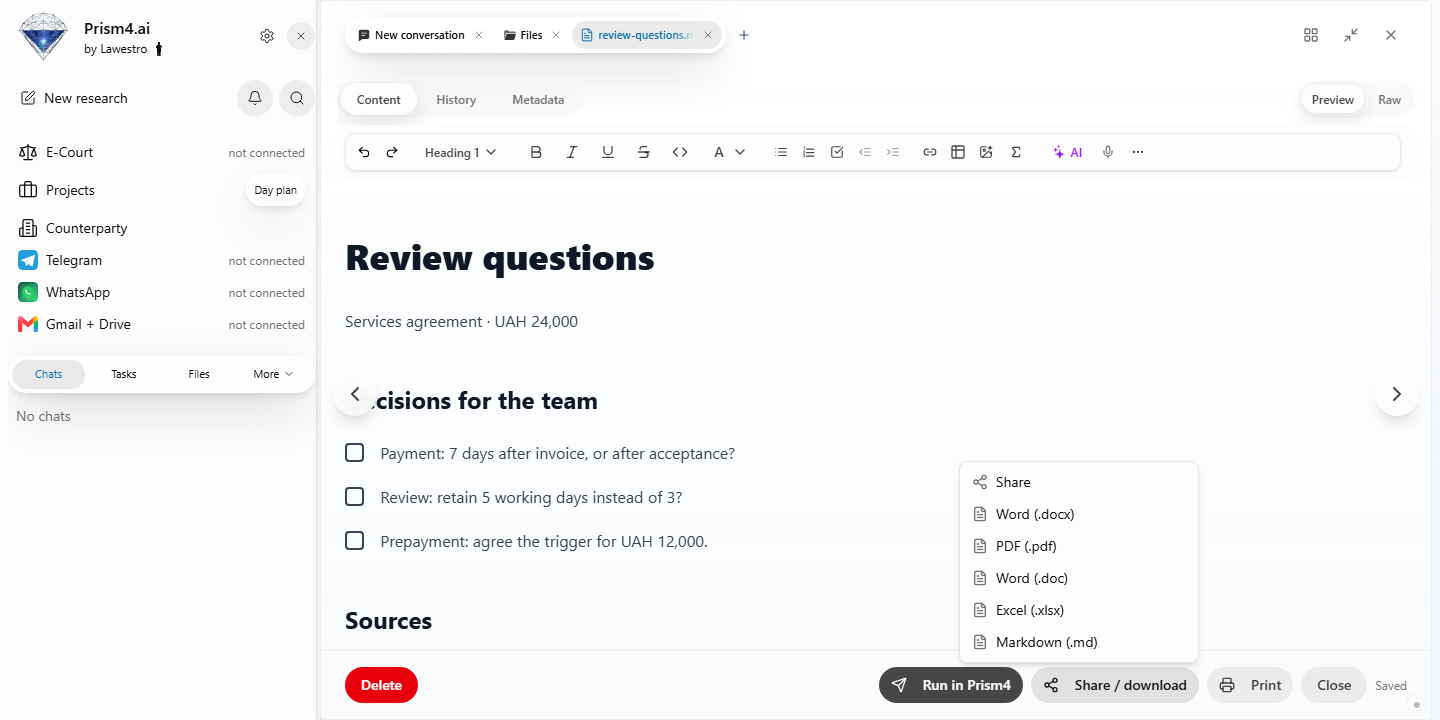
3. Export and open the files
Prism supports Markdown, Word .doc and .docx, and Excel .xlsx research-report exports. Select the required format and inspect the downloaded file.
| File | Inspect |
|---|---|
| Word | Headings, section order, links |
| Excel | Columns, values, units, long cells |
| Original report | Material supporting the output |
For the agreement example, check that UAH 24,000, both payment triggers, and both review periods remain in the table.
4. Hand over with context
Choose Prism when you need both a deliverable to share and the material to continue working. Name files for the question and version. Tell the colleague which column to complete or clause to revise. Retain sources in the project so the work continues in the same collection. Explore Prism research.