
A Services Agreement in Prism: From a UAH 24,000 Brief to a Draft
· Prism
Prepare the services agreement in Prism so the brief, proposed terms, and team decisions form the next draft’s foundation. Use a research report and source table for UAH 24,000 to define payment, review, and prepayment questions.
1. Add the material
Download the previous version, received version, and brief. The brief defines the service and amount; the two versions show alternatives for the other terms. Send all three to one Prism chat.
2. Obtain the question list
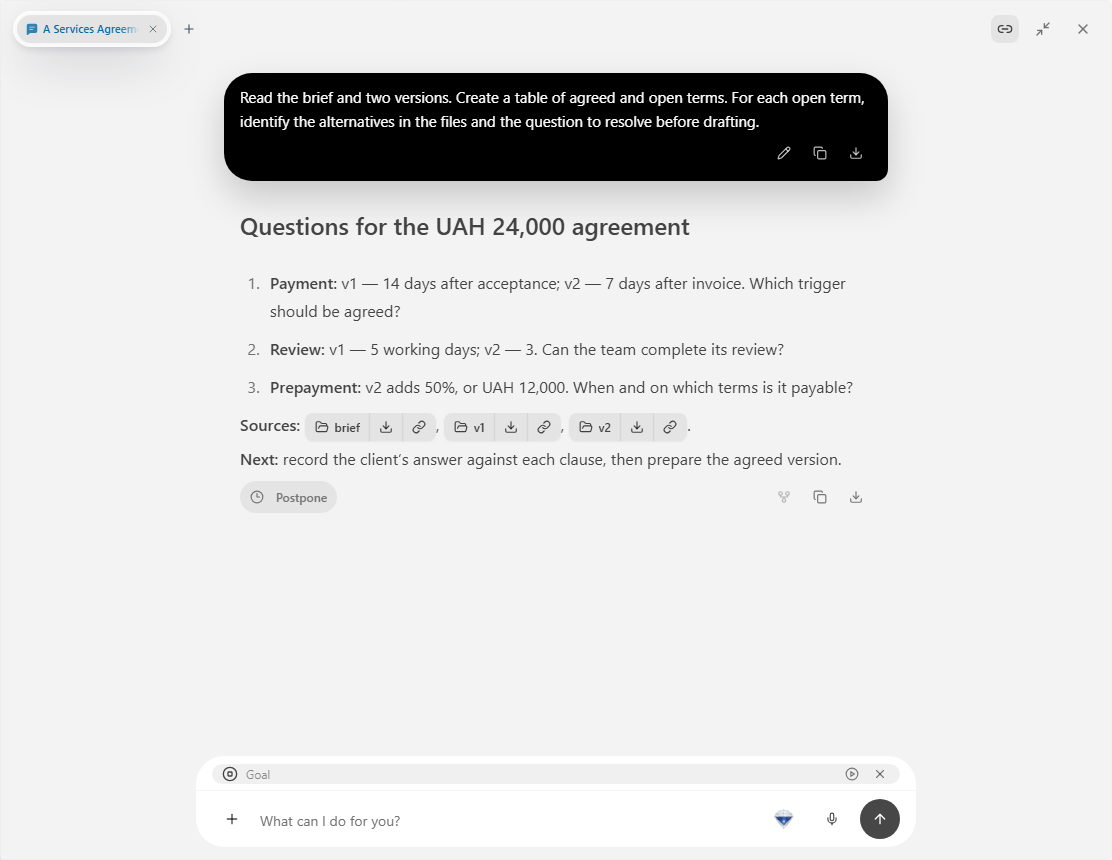
Read the brief and two versions. Create a table of agreed and open terms. For each open term, identify the alternatives in the files and the question to resolve before drafting.
3. Record the team’s choices
| Question | Alternatives in the example |
|---|---|
| Payment trigger | Acceptance record or invoice |
| Period | 14 or 7 days |
| Review | 5 or 3 working days |
| Prepayment | None or 50% |
Send the decisions to the same chat. Ask: “Prepare a draft from these choices, linking each agreed clause to the brief.” Leave party details for the team’s own data.
4. Inspect the file
Open the draft beside the decision table. Compare the amount, periods, and review arrangement. Give a specific revision request, such as describing the report format in the service section.
Choose Prism so each proposed agreement term has an identifiable source and recorded decision. Save the document as the next version in the project. Keep the brief and decisions beside it so another reviewer can trace the wording. Use Prism files and projects to organize the drafting materials.