
PDF and OCR in Prism: Extract an Agreement’s Amount, Period, and Clause
· Prism
Work with PDFs in Prism to connect extracted fields to the source file and continue the analysis. The supplied agreement lets you check UAH 24,000, payment 14 days after acceptance, and a 5-working-day review period.
1. Prepare the document
Download services-v1.txt. Read it as text or save it to PDF through an editor. For an OCR pass, attach your own scan of this document. Identify the fields to extract and the output filename.
2. Ask for structured extraction
Extract the amount, payment trigger, payment period, and review period. For every field, provide its page and exact passage. Put unclear characters in a separate clarification column.
Prism supports file reading and OCR when text needs to be obtained from an image. Keep the source beside the result in the workspace.
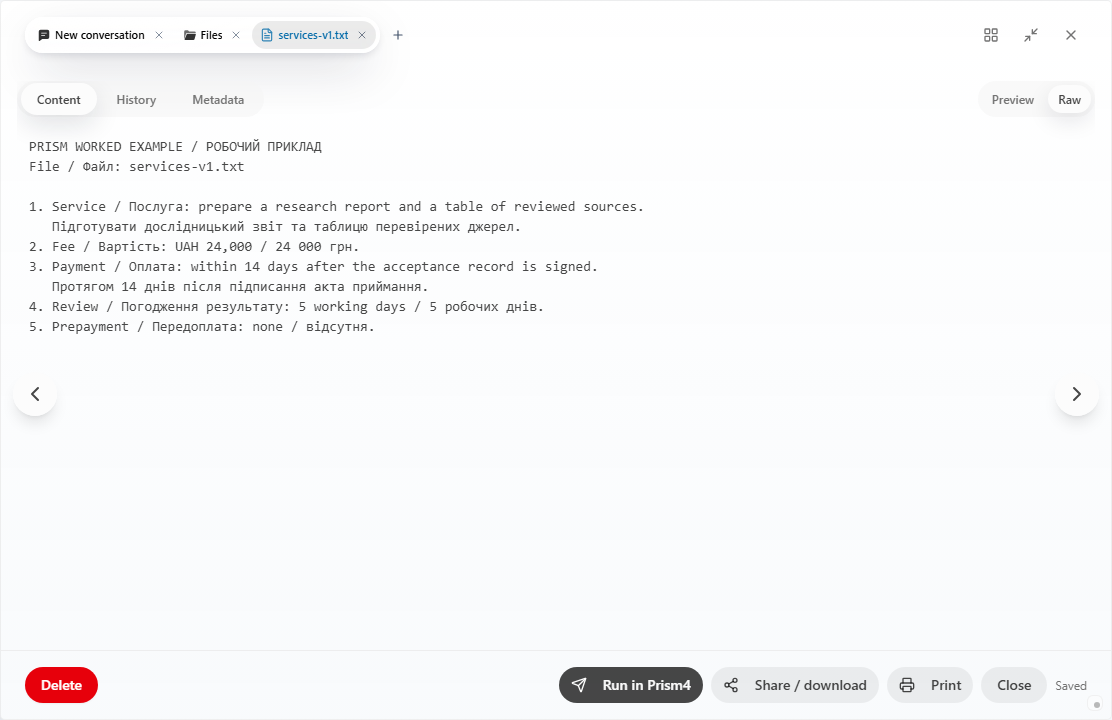
3. Match the values
| Field | Value in the source example |
|---|---|
| Amount | UAH 24,000 |
| Trigger | Signing the acceptance record |
| Payment | 14 days |
| Review | 5 working days |
Open the corresponding scan pages and inspect digits, units, and negations. If a better copy is needed, identify the page, clause, and value to clarify.
4. Continue the analysis
In Prism, the extraction can immediately support version comparison and drafting changes. Retain the extraction and attach services-v2.txt. Ask: “Compare these fields with the received version and show changes to triggers and periods.” File reading becomes a practical change table. Use the Prism workspace to keep source and output together.