
A Recurring Prism Task: Reviewing One Source Collection Each Week
· Prism
Set up recurring research in Prism so a repeated request continues work on the same question and project. For example, a team reviews defined counterparty sources each week and retains new questions.
1. Define the collection
Use identifier 31316718 and the public Nova Poshta profile. Add selected links and the question to review. Name the output “Weekly material list”.
2. Prepare the instructions
Review this defined collection each week. Compare with the previous list. For new material, provide its link, date, and relevance to our work. Retain a short follow-up list.
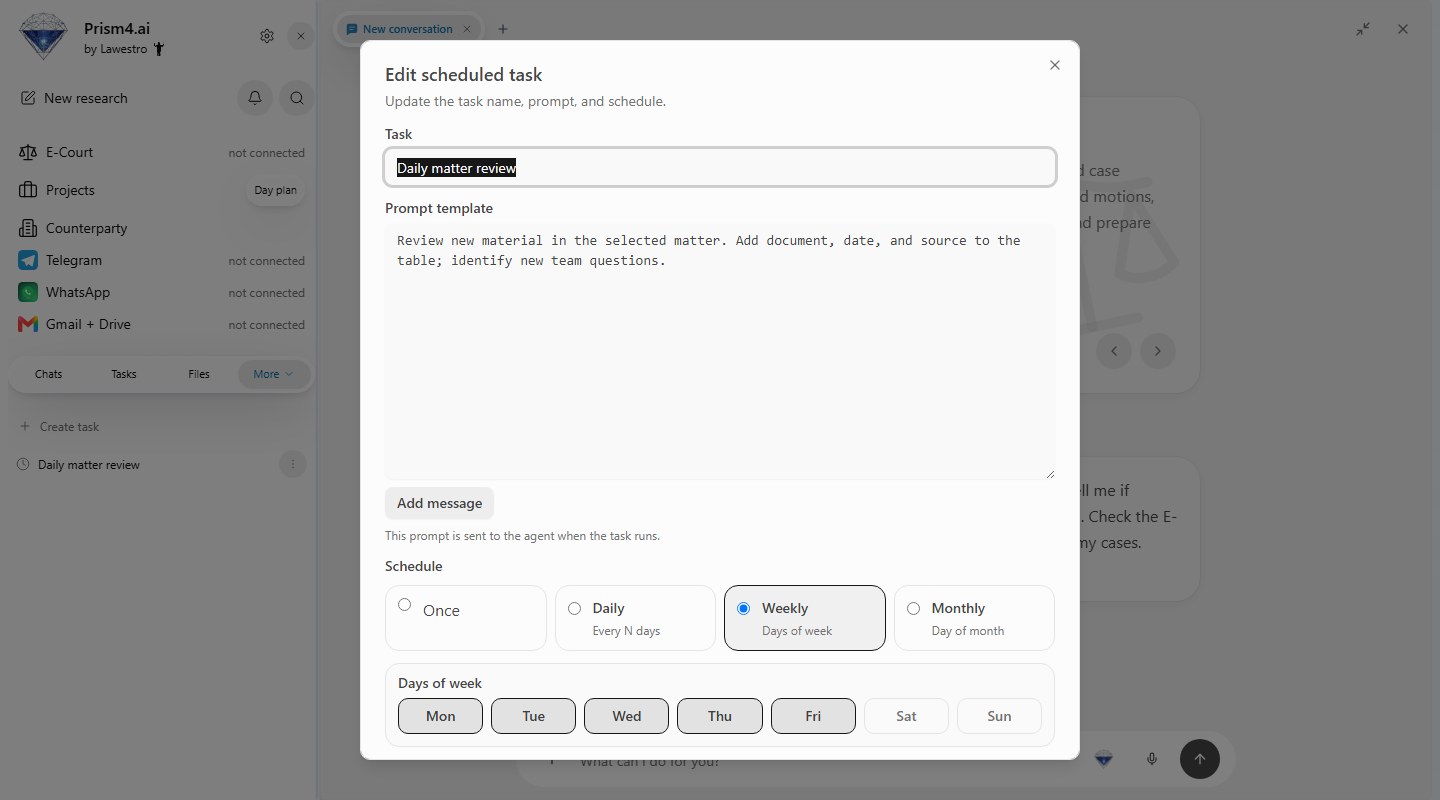
3. Configure and test
Create a planned task in Prism with a name, instructions, and schedule. Run a trial and inspect where its output appears.
| Item | Inspect |
|---|---|
| Sources | Links actually used |
| Comparison | Previous reading list |
| New material | Date and inclusion reason |
| Output | File or team message |
Retain the first run as the baseline. Ask subsequent runs to identify changes and questions requiring a response.
4. Connect output to the project
Create a work item for a new question and attach its source. Define which results should reach the team and who reviews them.
Prism suits recurring work when each new result should continue an existing investigation. When the question changes, revise or pause the task. Keep previous results beside project material. Explore Prism agents to organize repeated work.