
Prism Windows for Agreement Review: Source, Table, and Project Together
· Prism
Review changes in the Prism workspace with the chat, source document, and required files open together. Comparing two versions shows how to connect an agreement clause with the team’s decision and next task.
1. Open the material
Use the brief, v1, and v2. Add them to Prism and prepare a comparison. Open the files, research output, and project containing payment questions.
2. Give the task
Compare the payment clauses in these two files. Show both passages and changes to the trigger and period. Add three specific discussion questions.
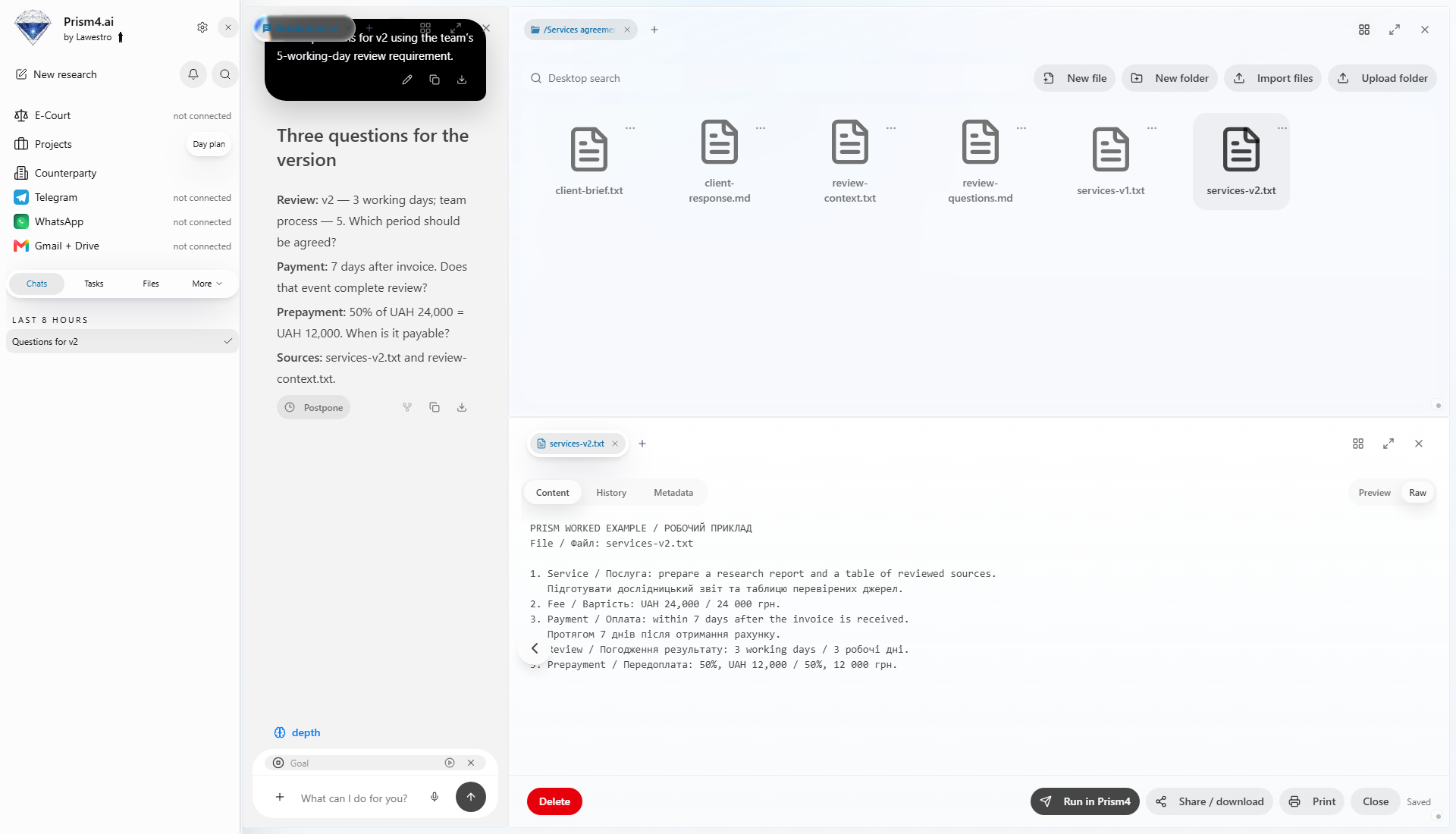
3. Arrange by role
| Window | Keep open |
|---|---|
| Source | Agreement clause |
| Report | Corresponding comparison row |
| Project | Question and owner |
Prism supports moving, resizing, and grouping windows. Choose a layout that makes it easy to move from conclusion to source. For another clause, open its passage and matching row.
4. Retain the decision
Record the team’s answer in the table. Ask Prism for the revision and open it beside the source.
Prism brings source review, discussion, and editing into one workspace. After review, save the file and identify the current version. Leave the next participant a short action: open the clause, inspect the decision, and finish the edit. Use the Prism workspace to keep the collection together.