
Statements and Sources in Prism: Separate a Contract Term from a Working Conclusion
· Prism
Separate facts, claims, and inferences in Prism so the team can see each statement’s basis and the next decision needed. Two agreement versions show the source wording, its change, and payment and review questions.
1. Add the files
Use the previous version, received version, and brief. The earlier text ties payment to acceptance, while the new text uses an invoice. This is a specific passage to place in a working table.
2. Request statement labeling
Separate the output into source wording, comparison, and working conclusion. For each statement, identify the file and clause. Explain which decisions the team needs to make about payment and review.
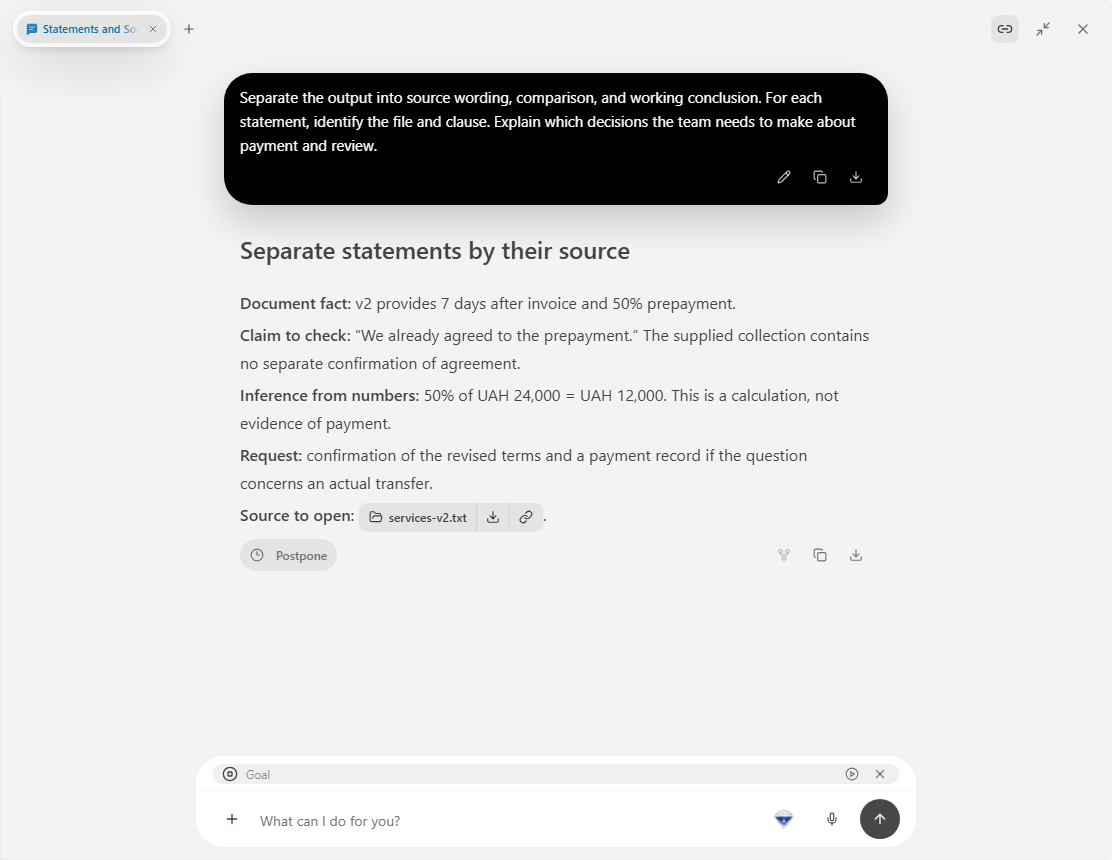
3. Read the three levels
| Level | Example |
|---|---|
| Source text | v2: 7 days after an invoice |
| Comparison | v1 used 14 days after acceptance |
| Working question | Which trigger will the parties agree? |
Ask for an “our answer” column. Fill it after discussing the terms with the people responsible for payment and the deliverable.
The table identifies a specific place to revise while preserving the underlying passage.
4. Carry decisions into the draft
Send the agreed answers to the chat and request revisions to only those clauses. Open the next version beside the table and inspect the changes.
Prism connects statement review with the source files and preparation of the next version. Retain both in one project. Apply the same sequence to a letter, record, or other document by replacing the files and keeping the levels. Explore Prism intelligence.